In this news article:
Tips for Teachers:
- Customising your dashboard
- How to save files on Sentral
- Marking attendance on the Sentral for Teachers App
- How to download class data
Tips for School Leaders and Administrative Staff:
- Taking the complexity out of school activities
- How to notify staff about Wellbeing incidents
- Start the school year strong with the Parent Portal and Sentral for Parents App
As a new school year begins, educators are preparing their classrooms, refreshing their resources and setting up the systems that will support learning throughout 2026. Sentral is at the heart of daily school operations, and with a few smart adjustments, it can become an even more powerful companion in managing classes, understanding students and staying organised.
Whether you're a seasoned Sentral user or just getting started, these practical tips will help you customise your workspace, streamline key tasks and make every school day run more smoothly.
Tips for Teachers:
1. Customising your dashboard
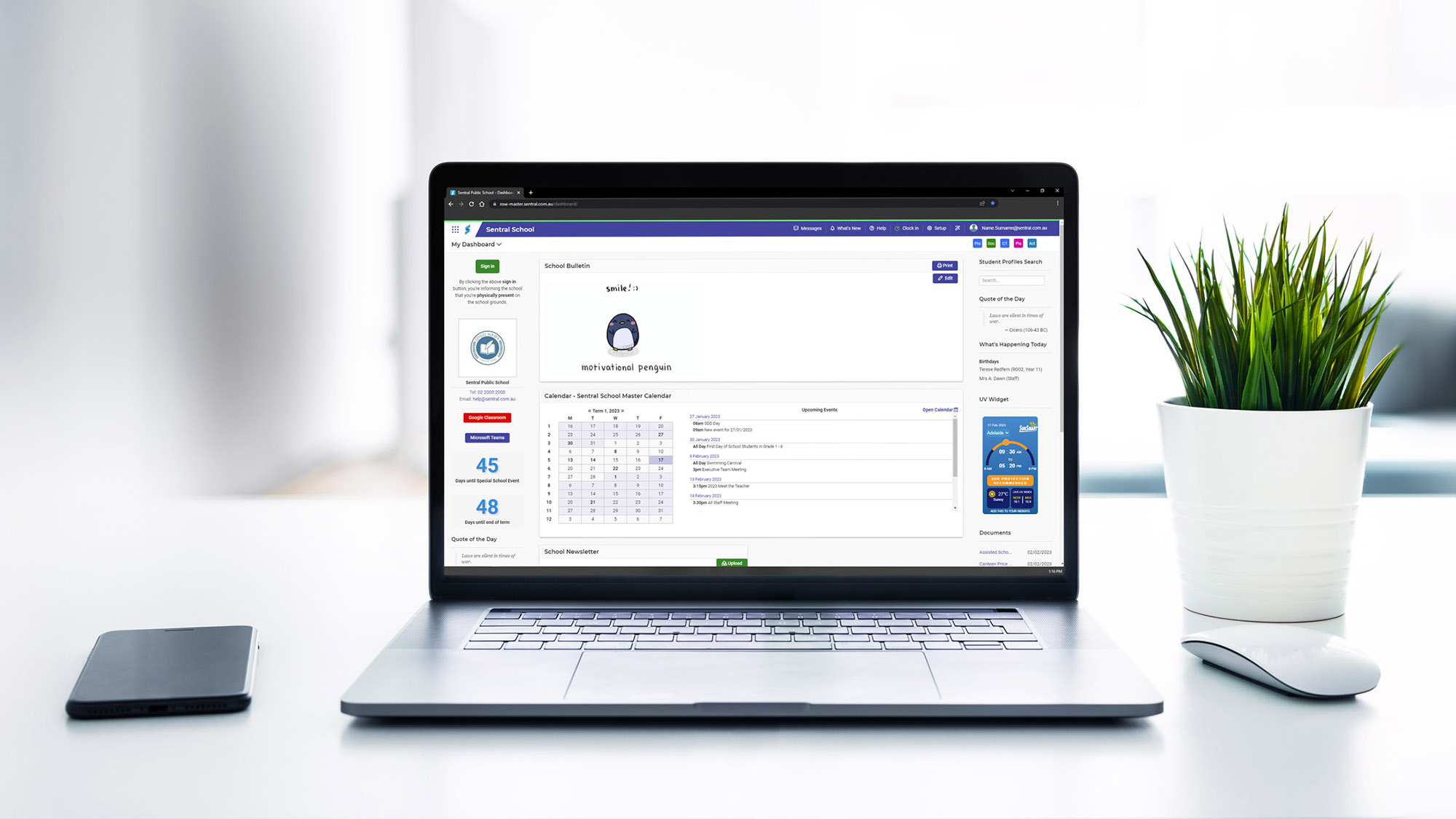
Your School Dashboard is the first thing you see when you log into Sentral - it's your quick-launch hub for all the tools and modules you use throughout the day. And the best part? You can customise it to suit the way you work.
To get started, simply select 'School Dashboard' in the top-left corner, then click on 'My Dashboard' then choose 'Create new Dashboard' from the drop-down menu. The dashboard is made up of three columns, and each one can be tailored to your preferences.
.png?width=1000&height=493&name=Untitled%20design%20(7).png)
Once you're in the customisation view, you can add helpful widgets to make your dashboard work smarter for you, including:
- Calendars: Add a widget to your dashboard to your dashboard to display your personal calendar to keep up to date on your schedule or your school calendar to be informed of school events.
- Communication tools: Depending on how your school communicates its daily/staff notices, pinning these widgets to the top of your dashboard means you won't miss out on any key school communications.
- My Timetable: Add your PxP timetable so your daily schedule is always right in front of you.
- Unmarked Rolls: A handy reminder that alerts you if you have an unsubmitted PxP roll, so you never miss one again.
.png?width=1000&height=493&name=Untitled%20design%20(6).png)
Note: Teachers can't remove or rearrange the default School Dashboard Widgets.
You can also add your most commonly used modules to the top-right corner of your dashboard, making them easy to access whenever you need them. This allows you to personalise your workspace, reduce the time spent navigating through menus, and streamline your daily workflow. Simply pin the modules you use most often so they're always visible and ready to launch. This can be done by clicking the pencil icon in the top right corner of your dashboard.
2. How to save files on Sentral
Did you know that you can save files directly in Sentral and access them from any device, anytime? It's a simple way to store and share important documents like class registers, unit programs, or seating plans - all in one secure place.
To upload a file, open the main menu on your dashboard. Under the Communication module, select Documents. Here, you can view the documents shared with all staff or upload your own under My Documents.
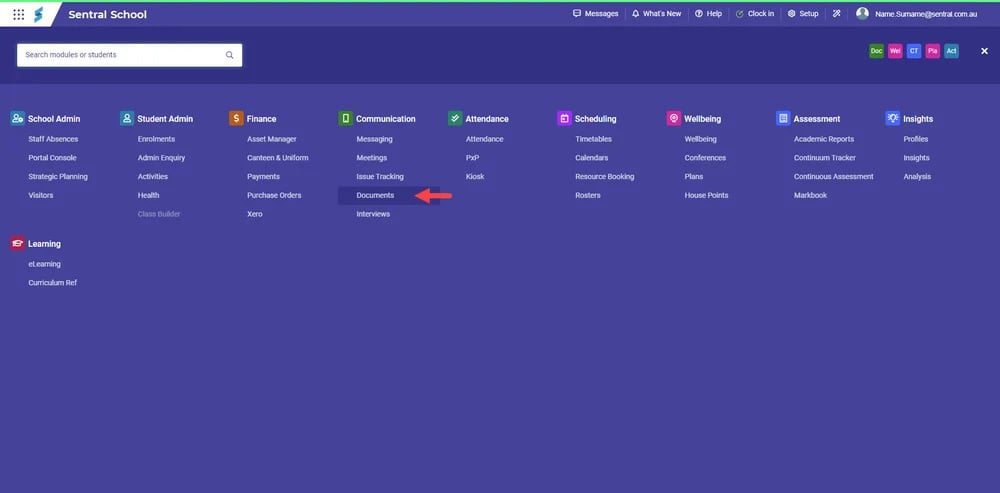
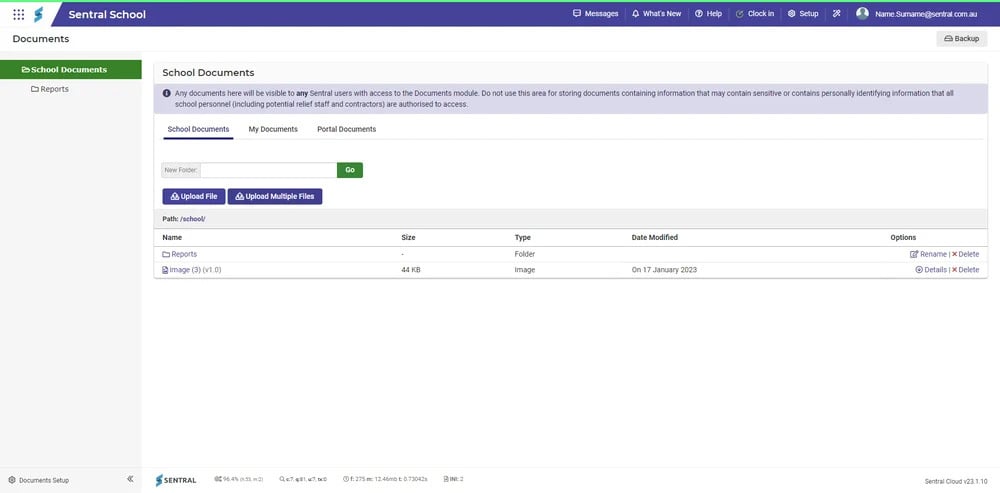
Sentral also lets you organise your files into folders. This is especially useful for faculty or year group folders, making it easy to share resources with a specific team or group of staff.
By saving documents in multiple places, especially in a cloud-based platform like Sentral, you reduce the risk of losing important information. Best of all, cloud storage means your files are available whenever and wherever you need them.
3. Marking attendance on the Sentral for Teachers App
With the Sentral for Teachers App, you can kick-start your school year with confidence and efficiency, allowing you to focus more on what matters most: teaching!
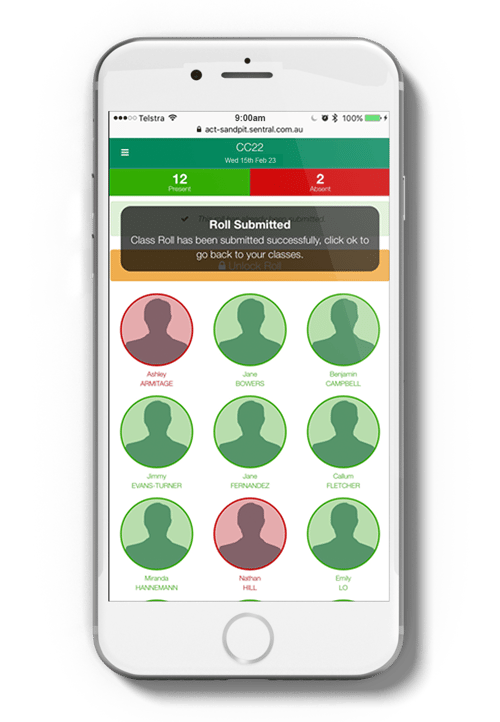
One of the main features of this App is having the ability to mark attendance. Marking attendance on your mobile device gives you the flexibility to take the roll anywhere - perfect for morning lines, outdoor lessons, or on-the-go supervision. With student photos displayed, you can mark the roll quickly and confidently, and it's especially handy for new teachers learning names and faces.
To get started, log in to Sentral on your mobile device and tap Attendance.
Choose the class you want to mark from your list. By default, all students are set to absent. To mark a student present, simply double tap their photo. When the photo disappears, the student will be recorded as present once you submit the roll.
For a step-by-step walkthrough, check out the quick mobile roll-marking tutorial on the Sentral YouTube channel.
4. How to download class data
At the start of the school year, teachers are faced with the important task of getting to know their students. Learning names, creating seating plans, and understanding individual needs can feel overwhelming - especially when managing multiple classes.
Downloading class data in a single report makes this process much easier. Having key information in one place helps teachers quickly familiarise themselves with their class and stay informed about critical details such as allergies, medical conditions, and emergency contact information. It can also save valuable time when reaching out to parents during those busy first weeks of term.
How to generate a class data report:
-
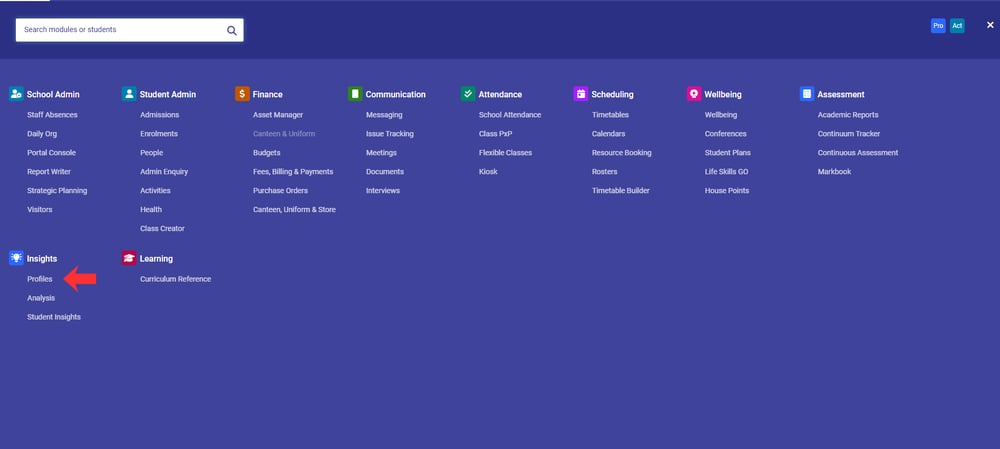
From the main menu, select the Profiles module.
-
Click Class from the left-hand menu.
-
Select your class.
-
Now you will see all the associated flags to each student in that class.
- Click Printer Friendly to generate a printable view of your entire class.
With everything organised in one report, you'll be well prepared to start the year confidently and focus on what matters most - supporting your students.
-1.png?width=1000&height=461&name=Untitled%20design%20(1)-1.png)
.png?width=1000&height=469&name=Untitled%20design%20(2).png)
.png?width=1000&height=465&name=Untitled%20design%20(3).png)
Tips for School Leaders and Administrative Staff:
1. Taking the complexity out of school activities
As schools continue to look for smarter ways to streamline operations in 2026, making the most of Sentral's Activities module is a simple but powerful step. By centralising excursions, incursion approvals, permissions, payments and risk management in one place, schools can reduce administrative load while improving visibility and compliance.
The Activities module helps ensure nothing slips through the cracks - with real-time tracking, clear communication with families, and accurate records that support duty of care. Investing time now to embed it into everyday processes sets schools up for smoother planning, safer experiences and more time focused on what matters most: student learning and wellbeing.
Discover how the Sentral Activities module can simplify planning in 2026, by looking at the Sentral Activities webpage.
2. How to notify staff about Wellbeing incidents
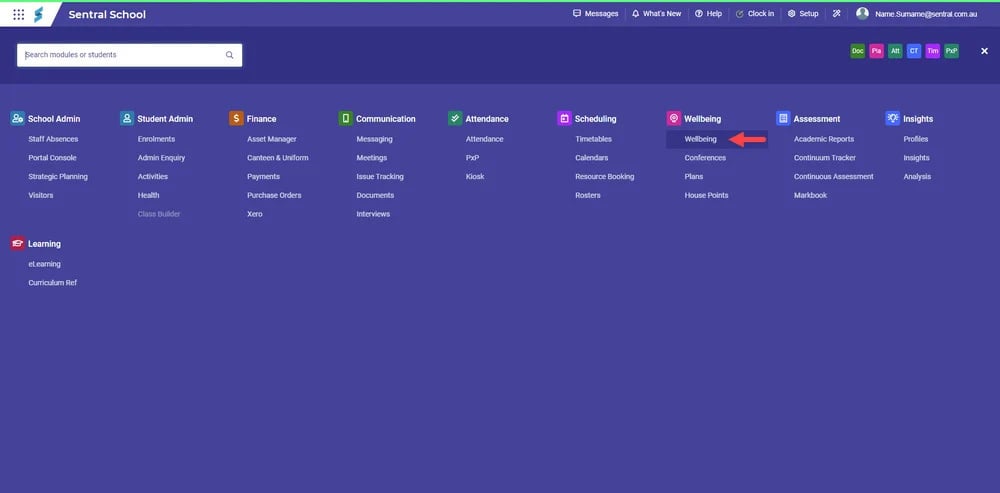
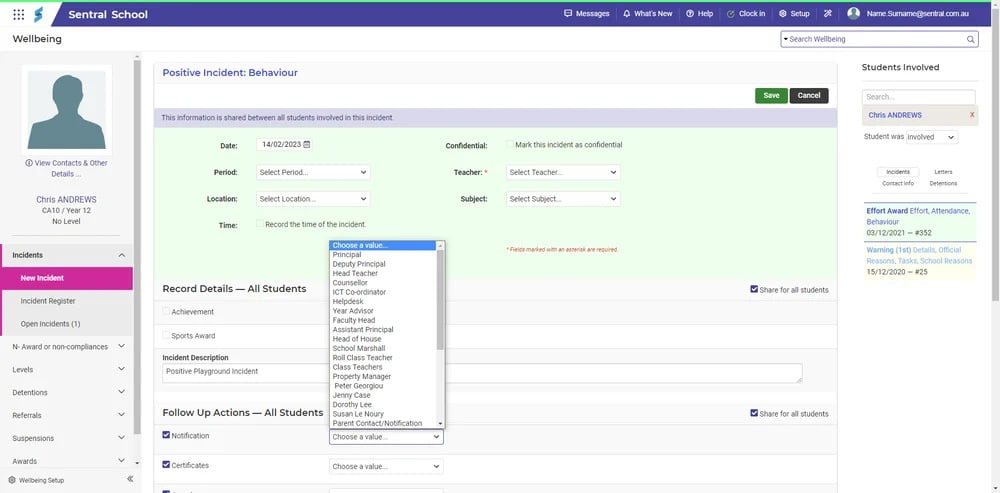
When you record an incident in the Wellbeing module, you can instantly notify the staff members who need to know. For example, if a teacher logs a positive playground incident, they can choose to notify the year coordinator directly while saving the record. That notification will then appear on the coordinator's dashboard, keeping everyone in the loop.
If an incident involves multiple students, you can easily notify the relevant staff for each student - ensuring the right people receive the right information at the right time.
3. Start the school year strong with the Parent Portal and Sentral for Parents App
As your school prepares to kick off another successful year, setting the foundation for strong communication and engagement is essential. Encouraging families to download and start using the Sentral for Parents App is one of the best ways to achieve this from day one. By guiding parents to the app early, you equip them with a central hub where they can stay informed with timely notifications, attendance updates, wellbeing insights, school reports and direct communication from teachers - all in one secure, easy-to-navigate space.
Promoting the Sentral for Parents App at the start of the year not only streamlines processes for your staff but also strengthens the home-school partnership by ensuring parents never miss important information. It's a simple, effective step that helps build well connected year ahead.
Why not take a look at our Sentral Parents webpage to learn more.
As schools move into 2026, taking time to set up Sentral thoughtfully can make a lasting difference. Small changes, like personalising dashboards, streamlining workflows and strengthening communication, help staff stay organised and focused on what matters most: supporting student learning and wellbeing.
If you would like to learn more handy tricks on Sentral, visit our YouTube channel and subscribe.